


Earthquake
4.7116.00 Reviews
App Specs
- Version
- 2.4.1
- Updated On
- License
- Free
- Downloads
- 1,000,000+
- Developer
- Nico Tranquilli
- Categories
- Weather
- Platform
- Android
Screenshots
 Analysis by AppCompare
I decide on an earthquake app by asking a practical question first: do I want a quick view of seismic activity, or do I need a tool for interpreting risk and planning an emergency response? Those are different jobs. Earthquake is aimed at people who want to follow events around the world through a map and alerts. I find that focus useful when I want to understand what has happened and where, without turning a routine check into a research project.
It is a free weather app from Nico Tranquilli, rated for Everyone, and it has an average rating of 4.7 from around 4,500 ratings, with over 100,000 installs. The current version is 2.0.1, and it runs on OS 8.1 or later. There are in-app purchases, listed at $5.49 per item, so I would check what an optional purchase covers before paying; the basic app is free. It was released on June 5, 2025, which makes it a relatively new option rather than a long-established reference I would trust without checking its current behavior for myself.
What kind of earthquake information do you need?
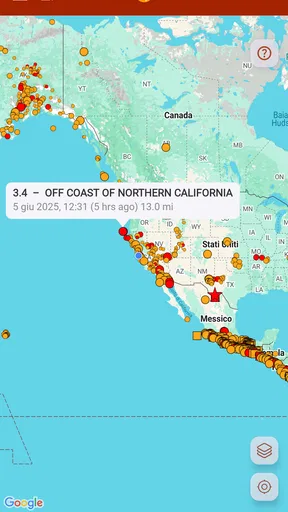
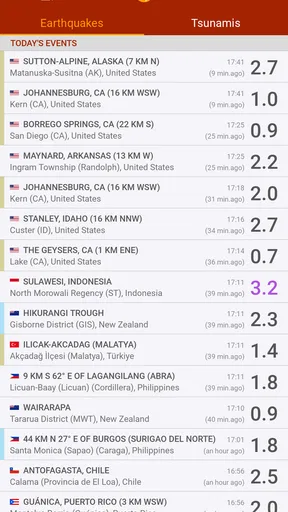
For casual monitoring, a world map can answer the first questions quickly: where was an event, and is it near a place I care about? Earthquake’s map-centered approach is a natural fit for that. A map is often easier to scan than a long list when I am comparing activity across regions, while a list-based earthquake tracker may suit someone who mainly wants to sort through recent events one by one. Neither presentation is automatically better; it depends on whether I think geographically or chronologically.
I would also separate awareness from safety advice. An alert can draw my attention to reported seismic activity, but it should not be treated as a prediction, a guarantee that I will receive advance warning, or a substitute for local emergency instructions. If I am making decisions about evacuation, building safety, or what to do during shaking, I would rely on official local guidance. That distinction matters particularly for visitors who may not know the warning systems in the area they are visiting.
Features that Rock
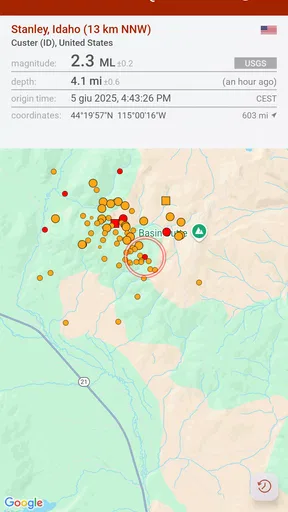
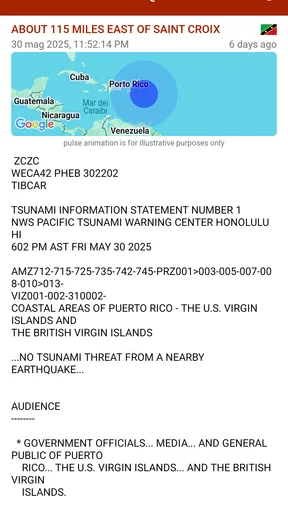
First off, the Earthquake app is loaded with some pretty nifty features. When you fire it up, you're greeted with a real-time map showcasing seismic activity worldwide. Now, I’m no cartographer, but seeing those little vibrations plotted on the map is a sight to behold. You can zoom in and out, and the app provides a detailed view of each region's tremors—down to the magnitude and depth of each quake.
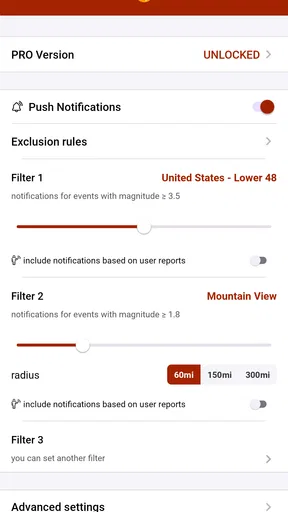
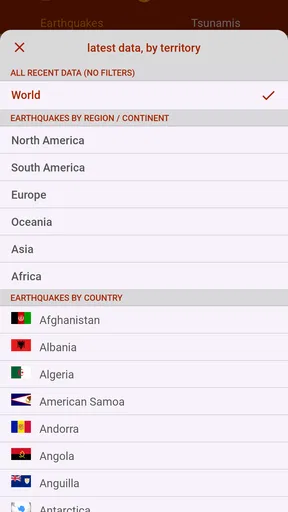
One feature I particularly loved is the customizable alerts. You can set notifications for specific regions or for quakes above a certain magnitude. This is super handy if you live in an area prone to earthquakes or if you're just a bit of a geology nerd like me. Imagine getting a buzz on your phone and instantly knowing there was a 5.0 magnitude quake halfway across the world—how cool is that?
User Experience
The app’s interface is clean and intuitive, which is a big win in my book. No one wants to fiddle around with complicated menus when trying to get quick info on seismic events. The developers have done a great job of keeping everything straightforward. The map loads quickly, and the data is presented in a way that even a non-expert can understand. You can tell they’ve put a lot of thought into the user experience.
Worth Reading Before You Choose

EA SPORTS FC Mobile 26 Is a Bigger Football Game, but It Takes Time

Flipboard Shows What News Apps Must Do Beyond the Feed

Switching to Android Auto Means Rethinking Your Driving Routine

Google Calendar Makes a Crowded Week Easier to Manage

Ludo King Makes the Most of the Minutes Between Plans

Baby Panda World Brings Quick Play to Modern Phones, but Its Game Library Feels Busy
For a more useful first session, I would avoid turning on every alert at once. I’d begin with the places I genuinely need to monitor, then choose a threshold that keeps routine notifications from drowning out the events I care about. If I am following family in another region, for example, a location-based alert can be more meaningful than a broad worldwide feed. A short test period helps reveal whether the chosen settings are informative or simply distracting.
Another small but valuable habit is to open the map after an alert rather than reacting to the notification alone. Location, magnitude, and depth are pieces of context, not a complete measure of what people on the ground experienced. Looking at where an event occurred relative to a city or coastline can help me understand why a distant quake appeared in my feed, while resisting the urge to infer damage from a number alone.
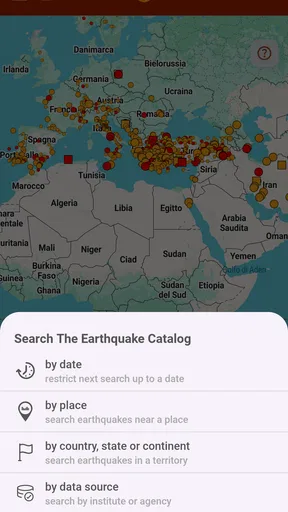
What’s more, the app offers a historical database of earthquakes, so if you’re curious about past events, it’s all there at your fingertips. I spent a good chunk of time scrolling through past quakes, and it’s fascinating to see patterns over time.
Where a map and alerts are most useful
A realistic everyday use is checking the app before messaging a friend after hearing that an earthquake happened in their part of the world. I can look at the map, see the reported location, and avoid relying on a vague social post that may be old or refer to a different event. I would still ask the person directly whether they are safe; a map can orient me, but it cannot report their situation.
For someone who lives in a seismically active area, I see the app as a quiet monitoring companion rather than something to stare at all day. A sensible routine might be to keep alerts limited to the local area, check the event details when one arrives, and use established local channels for preparedness instructions. Travelers can take a different approach: follow the destination before a trip, then remove it afterward so alerts remain relevant instead of accumulating around places they no longer care about.
The historical view is also useful for learning, provided I treat it as a way to explore reported events rather than as a forecasting tool. Comparing where activity appears over time can prompt good questions about plate boundaries or local geology, but a visible cluster does not tell me that another quake is due. For students, curious readers, or teachers preparing a discussion, that distinction makes the map a starting point for learning rather than a source of unsupported predictions.
Why You Should Download It
If you're still on the fence about downloading the Earthquake app, let me give you a nudge. Whether you're living in a quake-prone area or just have a budding interest in geology, this app offers a wealth of information that's both educational and practical. Not only does it keep you informed, but it also helps cultivate an awareness of how dynamic our planet really is.
Its strongest case is for people who want worldwide context without having to build their own routine from multiple sources. The combination of a map, event details, alerts, and past activity gives me several ways to approach the same subject: check a current report, keep an eye on a location, or browse older events out of curiosity. That breadth makes it more engaging than a bare notification feed, especially if I enjoy understanding where activity is happening instead of only seeing that something occurred.
It is less suited to someone who wants a conventional daily forecast for rain, temperature, or wind. Although it sits in the weather category, its purpose is seismic information, not planning what to wear or whether to carry an umbrella. If those are the decisions I need help with, a standard weather service is the better tool. Likewise, anyone who wants formal hazard assessment or emergency procedures should look to local authorities and specialist resources, not expect a general tracking app to replace them.
How it compares with other ways to follow earthquakes
Compared with a general news app, a dedicated earthquake tracker keeps the subject in view instead of waiting for a major event to become a headline. Compared with a plain list of reports, Earthquake’s map makes distance and regional context easier to grasp at a glance. A list can still be better when I want to scan entries in sequence, while official agency sources are the stronger choice when I need authoritative notices or local response guidance. I would use these options as complements, not assume one can replace every other source.
There is a trade-off in choosing global coverage: a worldwide view can be fascinating, but it can also make distant activity feel more urgent than it is for me. I would keep my notification choices tied to a real purpose, such as home, family, or a current destination. If I only want occasional background reading, I may prefer opening the app when curious rather than allowing every alert through. The right setup is not the one that generates the most updates; it is the one that helps me notice the events I actually need to follow.
For a first-time user, I would spend a few minutes checking how the map and event details work before relying on notifications. I would also review the app after changing phones or notification settings, since a useful alert system depends on the device allowing those notices through. That is ordinary setup friction, but it is worth addressing in advance rather than assuming a notification will reach me at a critical moment.
Getting the Most Out of It
To truly make the most of the Earthquake app, I recommend playing around with the settings to tailor it to your needs. Set up alerts for regions you’re most interested in, or perhaps explore the historical data to get a sense of seismic trends. The more you customize it, the more valuable it becomes.
I would make that customization deliberately: start narrow, observe how often notifications arrive, and widen the area only if the extra coverage serves a clear purpose. This keeps a personal feed readable and helps avoid alert fatigue. If I follow several places, I would note which ones are temporary—such as a holiday destination—and remove them when they stop being relevant. A little housekeeping can make the app feel more personal without requiring constant attention.
Also, don’t forget to explore the app’s educational resources. There are sections dedicated to understanding the science behind earthquakes, which is great for anyone looking to expand their knowledge beyond just the headlines.
There is a cost decision as well. Because the app is free to start and offers optional in-app purchases at $5.49 per item, I would use the free experience first and only consider paying if I can identify a specific addition I will actually use. That avoids paying simply because an upgrade is visible. I would also think about switching costs before making it my only source: the practical investment is not moving a large archive, but rebuilding alert preferences and getting comfortable with a different map or reporting style if I later try another tracker.
A good fit, with sensible boundaries
All in all, the Earthquake app is a fantastic tool for anyone interested in keeping tabs on the earth's movements. Its real-time updates, customizable alerts, and user-friendly interface make it a standout choice in the realm of seismic apps. So, if you’ve got a smartphone and a curiosity about earthquakes, this app is definitely worth a download.
I would recommend it most to curious readers, people following loved ones in different regions, and residents who want an accessible way to notice reported seismic events. I would skip it if I expect it to predict earthquakes, replace a local warning service, or provide a full emergency plan. It is also not the right choice when my main need is an everyday forecast. Those boundaries do not make it less useful; they keep my expectations matched to what a map-and-alert tracker can reasonably do.
Ready to get shaking with the Earthquake app? Hit that download button and start exploring the world of seismic activity today!
Pros
- Real-time alerts for nearby quakes.
- Simple
- intuitive user interface.
- Customizable notification settings.
- Worldwide earthquake data coverage.
- Offline mode for emergency use.
Cons
- Limited historical data access.
- Occasional alert delays.
- In-app ads can be intrusive.
- No social sharing options.
- Requires frequent updates.
FAQs for Earthquake
What features does the Earthquake app offer?
The Earthquake app provides real-time alerts about seismic activities worldwide. It includes detailed maps, personalized notifications based on location, historical data analysis, and safety tips. The app also features a community platform for sharing experiences and updates. Users can customize alert settings to receive information on specific regions or magnitudes.
Is the Earthquake app available for both Android and iOS devices?
Yes, the Earthquake app is available for download on both Android and iOS platforms. You can find it on the Google Play Store for Android devices and the Apple App Store for iOS devices, ensuring accessibility for a wide range of smartphone users.
How accurate are the alerts provided by the Earthquake app?
The Earthquake app sources data from reputable seismic monitoring organizations, ensuring high accuracy and reliability. While no system can predict earthquakes with absolute certainty, the app’s alerts are based on the latest available data, providing timely information to help users stay informed and prepared.
Does the Earthquake app require an internet connection to function?
Yes, an active internet connection is required for the Earthquake app to deliver real-time alerts and updates. However, some features, like historical data and safety tips, may be accessible offline. To ensure you receive timely notifications, it is recommended to have a stable internet connection.
Are there any costs associated with using the Earthquake app?
The Earthquake app is typically free to download and use, but it may offer in-app purchases or premium features for an enhanced experience. These could include advanced customization options, ad-free usage, or additional data insights. Check the app’s store listing for specific pricing details.


